QW Customer Support

Image for the badge Igniter.
Igniter earned for a 1-day streak!
Image for the badge Glow Getter.
Glow Getter earned for a 3-day streak!
Image for the badge Consistency Queen.
Consistency Queen earned for a 7-day streak!
Image for the badge Sweat Sister.
Sweat Sister earned for a 15-day streak!
Image for the badge Phoenix Queen.
Phoenix Queen earned for a 30-day streak!
Image for the badge Strength Builder.
Strength Builder earned for a 60-day streak!

07 May 16:02

Hey Queen! Great question! For the May Challenge, each daily movement or exercise is meant to be completed once through, so just 1x unless otherwise noted. However, if you’re feeling up to it and want to challenge yourself more, you’re absolutely welcome to repeat it for additional sets! Keep in mind, this challenge is about consistency and showing up daily, so listen to your body and do what feels best for you. If you ever need more clarification or support, feel free to email us at info@queenwarriors.com

Niesha chance Thank you so much for your feedback, Queen! We truly appreciate you sharing your thoughts, and we completely understand where you're coming from. We apologize for the confusion. Just to clarify, completing a 30-minute workout should still absolutely earn you a badge. That said, we always encourage finishing a workout in full to ensure it’s properly registered by the system. This badge feature is currently in beta, and our team is working hard behind the scenes to improve it daily, taking valuable feedback like yours into consideration. If you continue experiencing issues, please don’t hesitate to reach out to us at info@queenwarriors.com so we can assist further.

Hey Queen Niesha chance  If you completed your workout but don’t see your badge yet, here’s how you can manually check:

Open your QW app.

Tap "Account" in the bottom right corner.

Right at the top, you’ll see your earned badges if they’ve been awarded.

Also, please make sure the workout or replay was watched in full, system can detect if parts were skipped, and skipping can prevent badges from being awarded.

If you still don’t see it, feel free to email us at info@queenwarriors.com so we can look into it for you!

Reply

Great question, Queen Brianna Pender ! Yes, the “music” feature under replays allows you to play your own music while watching the workout. Here’s how it works:

Open your QW app.

Start playing a replay video.

Swipe up or use your home bar to open your music app (like Spotify or Apple Music).

Play your preferred song or playlist.

Swipe back to the QW app and continue watching the video with your own tunes playing in the background!

It’s a fun way to customize your workout vibe! 🎶💪 Let us know if you need any further help feel free to email us at info@queenwarriors.com

Reply

06 May 16:08

screenshot_20250506_231417_queen-warrior-tv-1.jpg

Hello Queen! Thanks for reaching out! Yes, you do earn badges when you complete replay workouts, mindset, or nutrition classes as long as the class is completed fully. Just a heads-up: system can detect if a video was skipped or not completed all the way through, which might affect badge awarding. So make sure you let that full video play from start to finish without skipping ahead. 

To check your earned badges:

Open your QW App

Tap on “Account” (bottom right corner)

Your badges will appear right at the top!

If you believe there’s still an issue, feel free to email us at info@queenwarriors.com and we’ll be happy to take a closer look for you!

Yesss Queen!!  Huge congrats on crushing that workout and earning your 1st badge! What a milestone! 💪🏽 Keep showing up, staying strong, and inspiring others. This is just the beginning 💜 Also, feel free to email us at info@queenwarriors.com for any concerns. 

Reply

06 May 11:16

screenshot_20250506_231417_queen-warrior-tv-1.jpg

Hey Queen! Yay for finishing your targeted area workout! Amazing job showing up for yourself! Badges usually appear within a few minutes after completing your workout, so no worries if you don’t see it right away. Just give it a moment, and you should see it pop up in your QW app under the “Account” section. A screenshot is provided below, for you to check.

If it doesn’t show up or you have any concerns, feel free to email us at info@queenwarriors.com and we’ll make sure everything’s in place for you

Hey Queen! 

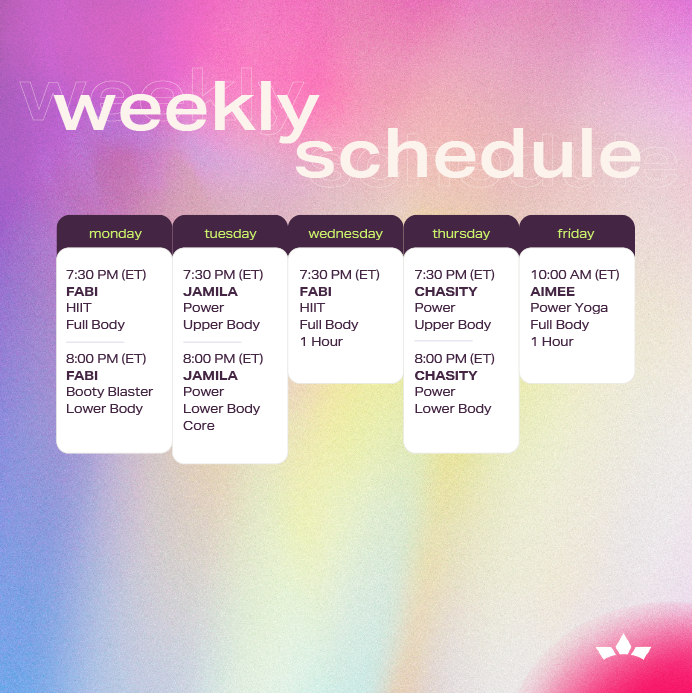
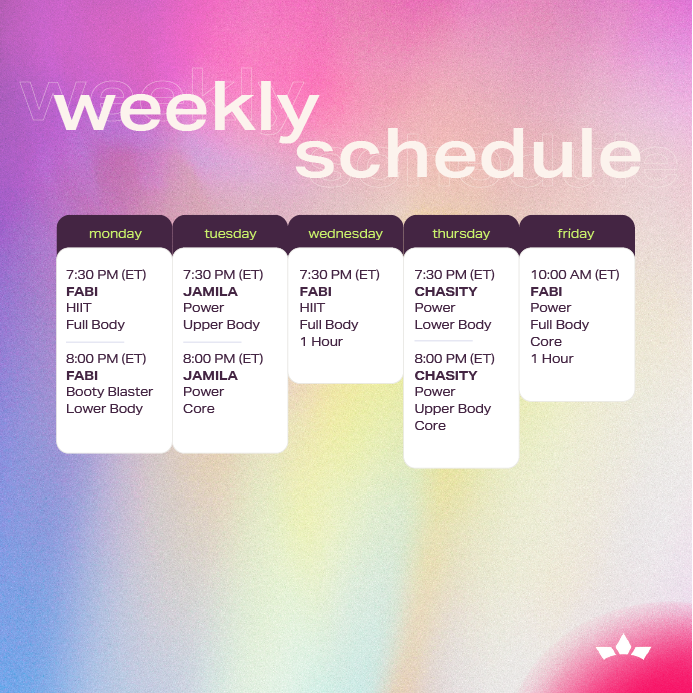
The easiest way to find and watch the live classes is right in your Calendar section of the QW app. Here’s how to access it:

Open your QW app

Tap “Calendar” at the bottom of your screen

Once you’re in, tap on the date: for example, today (May 6) will show Coach Jamila’s Power class

Just click on the class, and it’ll take you straight to the Live session when it starts!

If you have any trouble or questions, you can always email us at info@queenwarriors.com

Hey Queen! If you completed your workout, you should definitely receive your badge you earned it! Sometimes it may take a moment to reflect, but you can also manually check by following these steps: Open your QW app, tap on “Account” in the bottom right corner. At the top, you’ll see your earned badges If it’s still not showing up, feel free to email us at info@queenwarriors.com so our team can take a closer look and make sure you get what you deserve!

Hey Queen! Yay on completing your workout this morning, you're already crushing it! To check out your earned badges, just open your QW app, tap on “Account” located in the bottom right corner of your screen, and right at the top you’ll see your badge achievements proudly displayed! If for any reason you’re not seeing them or need help, feel free to email us at info@queenwarriors.com We’ve got you! 

Reply